Cart

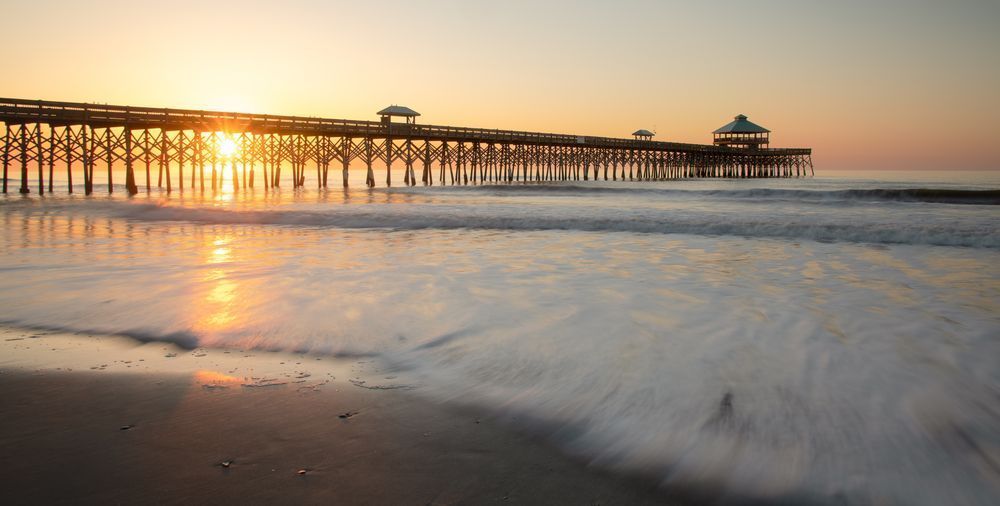
After months of sheltering in place during the 2020 pandemic, I couldn’t take it anymore. The weight of isolation felt suffocating, and I needed to escape, to feel alive again. So, I packed up my truck, Denver, loaded Christian into the passenger seat, and we hit the road, bound for Folly Beach, South Carolina. The mission was clear: capture the perfect shot of the iconic Folly Beach Pier, a vision that had been living in my mind for far too long.
As we arrived, the salty air hit my face like a refreshing wave. The sound of seagulls echoed, blending with the rhythmic crash of the waves. Christian ran ahead, his laughter filling the space between us. The beach, still early in the morning, was nearly deserted—a peaceful sanctuary where the world’s troubles seemed to fade away.
The sand was warm beneath my feet, the tangy scent of saltwater filling my senses, and the wind tugged at my hair. The sun rose higher, bathing the pier in a golden light, and I knew the moment had arrived. I steadied my camera, framing the shot I had dreamed of for so long. It wasn’t just a photograph; it was God’s artistry—a reminder of His presence and the beauty that persists, even in the darkest times.
Standing there, I felt the hope I had been searching for. One day, I knew, we would come through this—stronger, united, and free again.
Photographer Notes:
 In the above one-minute video, I take you out with me to Folly Beach to photograph the sunrise of The Pier at Folly Beach outside of Charleston, South Carolina.
It was a cool March morning at Folly when my alarm woke me at 3 am. I have to be honest, it was hard to get motivated to get out of my warm TIDES Hotel bed and head down to the Pier. But after the alarm continued to go off, I forced myself out of bed, drank some coffee, and set off to the beach.
My goal was to capture several exposures of the pier, from the moon overhead to the sun breaking across the horizon. Morrow Tide was one of my later exposures and certainly my favorite. I hope you enjoy it.
This is only visible to you because you are logged in and are authorized to manage this website. This message is not visible to other website visitors.
Click on any Image to continue

This means you can use the camera on your phone or tablet and superimpose any piece of art onto a wall inside of your home or business.
To use this feature, Just look for the "Live Preview AR" button when viewing any piece of art on this website!


This means you can use the camera on your phone or tablet and superimpose any piece of art onto a wall inside of your home or business.
To use this feature, Just look for the "Live Preview AR" button when viewing any piece of art on this website!